
How to print police recruitment examination slip 2026
Police recruitment examination slip guide for successful candidates.
You have been shortlisted for the Nigeria Police Force recruitment. Congratulations. But the next step is critical: printing your examination slip. Without it, you cannot enter the CBT exam hall. Period.
At this stage, many candidates make avoidable mistakes—delaying their slip printing, ignoring portal updates, or showing up unprepared on exam day. This guide is designed to help you avoid those costly errors and move forward with confidence.
In this article, you will learn:
- When the examination slip is available
- Step-by-step guide to print your slip (with screenshots)
- How to check your exam date and CBT center
- Required documents for exam day
- Approved dress code
- Common printing errors and how to fix them
- What to do if you cannot print your slip
- How to avoid exam-related scams
Everything here is written to give you clear, practical steps you can follow immediately.
Important: Print your slip immediately after reading this guide. Do not wait until the night before the exam.
YOU MAY LIKE TO READ:
Federal Government Recruitment 2026/2027: Full Application Guide for Nigerians
Police Recruitment Portal 2026: Updates, Requirements & How to Apply
How to Check PSC Shortlisted Candidates 2026/2027 — Nigeria Police Recruitment List
Key Information — Police Recruitment Examination 2026
Before you proceed to print your police recruitment examination slip, it is important to understand the key details about the CBT exam. This will help you avoid confusion and prepare properly.
Here is a quick reference table:
| Detail | Information |
|---|---|
| Exam name | Police Recruitment Computer Based Test (CBT) |
| Exam dates | April 28 – 30, 2026 |
| Slip availability | Open now (check portal daily) |
| Official portal | npfapplication.psc.gov.ng |
| Printing fee | FREE |
| Registration/Login | Required (use your application email and password) |
| Mobile printing | Download PDF on phone; print at cyber café |
The Police Service Commission has announced that the written examination for shortlisted candidates will hold from April 28 to April 30, 2026 across designated CBT centers nationwide.
It is important to understand that candidates will not all write on the same day. Your specific exam date, time, and venue are uniquely assigned to you and clearly stated on your examination slip.
You are strongly advised to check the portal regularly, as updates may be released in batches. Once your slip is available, download and print it immediately.
Delaying this step can expose you to avoidable risks such as portal downtime or last-minute technical issues.
Step-by-Step — How to Print Police Recruitment Examination Slip

Printing your police recruitment examination slip from the official portal is straightforward—if you follow the correct steps. This section walks you through the exact process used by shortlisted candidates to download their NPF CBT slip from npfapplication.psc.gov.ng without errors.
Take your time and follow each step carefully.
Step 1: Visit the Official NPF Application Portal
Start by going to the official Police recruitment portal:
This is the only legitimate website for printing your police recruitment examination slip. Avoid clicking on links shared via WhatsApp or unknown websites, as many of them are fake.
For best results:
- Use Google Chrome or Mozilla Firefox
- Avoid Opera Mini, as it may not load the portal correctly
- Use a laptop or desktop if available (mobile phones also work, but may be less stable)
- Ensure you have a strong internet connection
If the page does not load immediately, do not panic. The portal may be experiencing heavy traffic, especially during peak hours. Try again after a few minutes or switch to a better network.
Step 2: Log In to Your Account
Once the portal opens, the next step is to log in using the details you used during your application.
Enter the following:
- Your email address (the one used during registration)
- Your password
Then click the “Login” button.
If you have forgotten your password:
- Click on “Forgot Password”
- Enter your registered email
- Check your inbox (and spam folder)
- Click the reset link sent to you
- Create a new password and log in again
Make sure your login details are correct. Multiple failed attempts may temporarily lock your account.
Step 3: Navigate to the Examination Slip Section
After logging in successfully, you will be redirected to your dashboard.
On this dashboard, look for any of the following options:
- “Print Examination Slip”
- “Download CBT Slip”
- “Proceed to Examination”
The exact wording may vary slightly, but they all lead to the same function.
Click the appropriate button to continue.
If you do not see any of these options:
- Your batch may not have been released yet
- You may need to check again after 24–48 hours
- Or confirm that you were shortlisted
Do not assume there is a problem immediately—updates are often released in phases.
Step 4: Select Exam Slip Preference (If Prompted)
In some cases, the portal may ask you how you want to access your slip.
You may see options like:
- Download as PDF
- Print directly
Always choose “Download as PDF.”
Why?
- It allows you to save a permanent copy
- You can reprint anytime if needed
- It serves as a backup in case of loss
Avoid printing directly without saving—you may not get another chance if something goes wrong.
Step 5: Download and Print Your Examination Slip
Once you select the download option, your NPF examination slip will be generated and displayed.
Carefully review the details on the slip. It should contain:
- Your full name
- Your application number
- Your examination date
- Your examination time
- Your exam center address
- Your seat or table number (if assigned)
Before downloading, double-check that all information is correct.
If everything looks good:
- Click the Download button
- Save the file in PDF format
- Store it on your phone and computer
Next, print your slip.
You can:
- Print at home (if you have a printer)
- Or visit a cyber café
Important printing tips:
- Print at least 3 copies
- Use clear, legible print quality
- Avoid blurry or faded prints
- Keep one copy as backup
Important Reminder
Do not stop at downloading—printing is mandatory.
Many candidates make the mistake of saving the PDF but forgetting to print it until the last minute. This often leads to unnecessary stress due to:
- Power outages
- Printer failures
- Cyber café delays
Print your slip immediately once downloaded.
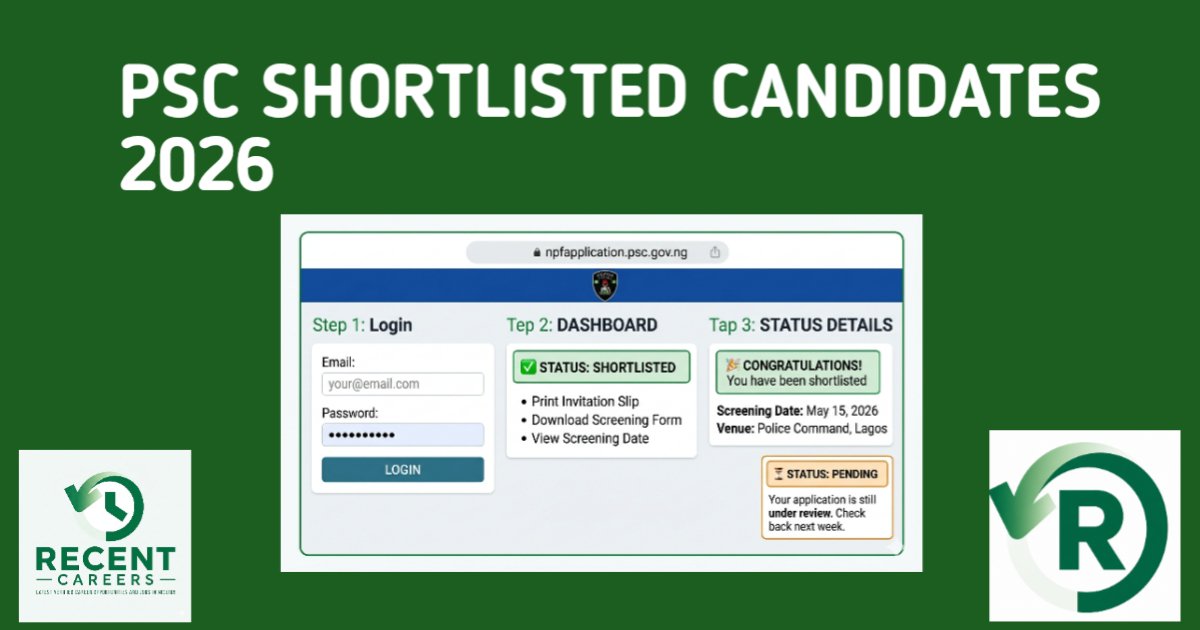
Screenshot Suggestion (For Your Article)
To improve user understanding and SEO engagement, include:
A mockup image showing:
- The dashboard interface
- The “Print Examination Slip” button
- Where to click
This helps readers follow the process visually and reduces confusion.
Important guide
Printing your police recruitment examination slip is one of the simplest steps in the recruitment process—but also one of the most important.
Take it seriously, follow the steps above, and complete it early.
What Your Examination Slip Looks Like
After downloading your police recruitment examination slip, it is important to carefully review every detail on the document. This slip is your official entry pass, and any error can create serious issues on exam day.
Use the table below to verify all key fields:
| Field | What to Verify |
|---|---|
| Full name | Matches your certificates exactly |
| Passport photograph | Clear and recognizable |
| Examination date | Note this immediately |
| Examination time | Plan to arrive 1 hour early |
| Exam center address | Search location on Google Maps |
| Application number | Keep this number safe |
Here is a sample format of what your slip will look like:
┌─────────────────────────────────────┐
│   NIGERIA POLICE FORCE              │
│   RECRUITMENT EXAMINATION SLIP 2026 │
├─────────────────────────────────────┤
│  Name: ADEBAYO, Michael Oluwaseun   │
│  App No: NPF/2026/0245871           │
│  Exam Date: April 29, 2026          │
│  Time: 9:00 AM                      │
│  Venue: CBT Centre, Yaba, Lagos     │
│  Table: 42                          │
├─────────────────────────────────────┤
│  [Passport Photo]                   │
└─────────────────────────────────────┘
If any information on your slip is incorrect—such as a wrong name or photo—contact PSC immediately via info@psc.gov.ng.
How to Check Your Examination Date and Center
Your NPF examination slip contains all the details you need for your CBT exam. Do not rely on assumptions or general announcements—your schedule is unique to you.
Your slip will clearly show:
- Your exact exam date (April 28, 29, or 30, 2026)
- Your specific exam time (morning or afternoon session)
- Your assigned CBT center address
- Your designated computer or table number
Immediately after printing your slip, take these actions:
| Action | Why |
|---|---|
| Highlight your exam date | So you do not forget |
| Search your center on Google Maps | Avoid getting lost |
| Calculate travel time | Plan for traffic delays |
| Plan to arrive 1 hour early | Late entry is not allowed |
Do not assume all candidates are writing on the same day. Your exam date is fixed and cannot be changed.
Missing your scheduled date means automatic disqualification—no rescheduling, no exceptions.
Once done, you can move on to preparing for your CBT exam with confidence.
Required Documents for Police CBT Exam
After printing your police recruitment examination slip, the next step is preparing everything you need for exam day. Coming unprepared—even if you have your slip—can lead to disqualification.
Below are the mandatory items you must bring. There are no exceptions:
| Item | Quantity | Notes |
|---|---|---|
| Printed examination slip | 2 copies | One for entry, one as backup |
| NIN slip (with clear photo) | 1 original | Issued by NIMC |
| Pen (blue or black ink) | 2 | Keep one as backup |
| Water bottle | 1 | Optional but recommended |
Make sure your NIN slip is clear and readable. Blurred or damaged prints may be rejected at the exam center.
Dress Code (Strictly Enforced)
The Nigeria Police recruitment CBT has a compulsory dress code. You must comply fully:
| Clothing Item | Requirement |
|---|---|
| T-shirt | White (plain, no logos, no text) |
| Shorts | White (plain) |
| Shoes | White canvas shoes (not sneakers, not slippers) |
| Socks | White stockings |
Your appearance will be checked before entry. Non-compliance can get you turned away.
Prohibited Items (Do NOT Bring)
Certain items are strictly banned at the CBT center:
| Item | Why |
|---|---|
| Mobile phone | Not allowed inside exam hall |
| Calculator | Not needed for CBT |
| Books or notes | Considered cheating |
| Bag or backpack | Must be left outside |
| Jewelry or watches | Restricted in some centers |
| Food | Only water is allowed |
If you come with prohibited items, you may be asked to leave them outside—at your own risk.
Important Reminder:
The dress code is not optional. Candidates who arrive wearing jeans, colored clothes, or non-white footwear will be denied entry—even if they have a valid examination slip.
What If You Lose Your Examination Slip?
Losing your police recruitment examination slip can be stressful—but it is not the end of the road. The good news is that you can easily reprint it from the official portal.
Follow these simple steps:
| Step | Action |
|---|---|
| 1 | Go to npfapplication.psc.gov.ng |
| 2 | Log in with your email and password |
| 3 | Click on “Print Examination Slip” |
| 4 | Download and reprint your slip |
As long as the portal is still open, you can generate another copy without any penalty.
Prevention Tips
To avoid last-minute panic, take these precautions immediately after downloading your slip:
- Save the PDF on your phone (Google Drive, iCloud, or Telegram saved messages)
- Email a copy to yourself for easy access
- Print at least 3 copies (keep one at home, one in your bag, one with a trusted person)
- Take a clear screenshot as an extra backup
Printed copies can get lost, torn, or damaged. Keeping a digital version ensures you can reprint your slip at any cyber café within minutes.
Common Problems and Solutions
While trying to print your police recruitment examination slip, you may encounter a few technical issues. These are common and usually easy to fix if you act early.
Problem 1: Portal Is Not Loading
| Possible Cause | Solution |
|---|---|
| High traffic (many candidates online) | Try printing between 2 AM – 5 AM when traffic is low |
| Poor internet connection | Switch to a stronger network or use a mobile hotspot |
| Browser issues | Use Chrome or Firefox (avoid Opera Mini) |
Problem 2: Forgotten Password
Solution:
- Click “Forgot Password” on the login page
- Enter your registered email
- Check your inbox (including spam folder)
- Click the reset link and create a new password
If you don’t receive any email, contact PSC support via info@psc.gov.ng.
Problem 3: No “Print Examination Slip” Button
| Possible Reason | Solution |
|---|---|
| Your batch has not been released | Check again after 24–48 hours |
| You were not shortlisted | Confirm your application status |
| Portal glitch | Clear browser cache or try another device |
Problem 4: “Server Error” When Downloading
Solution:
- Refresh the page after a few minutes
- Try during off-peak hours (late night or early morning)
- Use incognito/private browsing mode
- Switch to another internet connection
Problem 5: Wrong Information on Slip
| Action |
|---|
| Take a screenshot immediately |
| Email PSC at info@psc.gov.ng with your application number |
| Contact the PSC helpline (if available) |
| Keep checking the portal for updates |
Important Reminder:
Do not wait until the night before your exam to print your slip. Technical issues are common, and PSC responses may take up to 48 hours.
What to Expect on Police CBT Exam Day
Understanding what happens on exam day will help you stay calm and fully prepared. The Police Recruitment CBT process is structured and strictly monitored.
Arrival Time
- Arrive at least 1 hour before your scheduled exam time
- Gates may close 30 minutes before the exam begins
Late arrival can lead to immediate disqualification, regardless of your reason.
At the Exam Center
Once you arrive, you will go through several stages:
| Stage | What Happens |
|---|---|
| 1. Security check | Officers verify your examination slip and NIN |
| 2. Dress code inspection | Your white attire is checked |
| 3. Biometric verification | Fingerprint or facial capture |
| 4. Computer assignment | You are assigned a system |
| 5. CBT instructions | Rules are explained by invigilators |
| 6. Exam begins | Timed test (usually 60–90 minutes) |
| 7. Exam ends | Results may appear immediately or later |
Follow all instructions carefully. Any form of misconduct can lead to disqualification.
What the CBT Covers
| Subject | Questions |
|---|---|
| English Language | 30 |
| Mathematics | 20 |
| General Knowledge | 30 |
| Logical Reasoning | 20 |
| Total | 100 |
Your phone will be confiscated if found inside the exam hall. To avoid issues, leave it at home, in your car, or with a trusted person before entering the center.
After the Exam — What Next?
Once you complete your Police CBT exam, your next steps are just as important as your preparation. What you do immediately after the exam can help you stay focused and ready for the next stage.
Immediately After the Exam
| Action | Why |
|---|---|
| Do not discuss answers with others | Avoid confusion and unnecessary stress |
| Keep your examination slip safe | It may be required for result checking |
| Wait for official announcement | Results will be released via the portal |
Resist the urge to compare answers with other candidates. It often leads to doubt and anxiety, especially when answers differ.
What Happens After CBT
| Stage | Timeline |
|---|---|
| CBT results released | 2–4 weeks after exam |
| Successful candidates announced | Shortlist published on portal |
| Training invitation | Sent to selected candidates |
| Police College training begins | Typically within 6 months |
Results are usually released on the same portal where you printed your examination slip. You will need your login details to access it.
How to Check CBT Results After Exam
After the examination, you can check your result online through the official portal.
Steps to Check Your Result
| Step | Action |
|---|---|
| 1 | Visit npfapplication.psc.gov.ng |
| 2 | Log in with your email and password |
| 3 | Click “Check Examination Result” |
| 4 | View your score (if available) |
| 5 | Check your status: Pass or Fail |
What Your Result Status Means
| Status | Meaning |
|---|---|
| Qualified | You passed and proceed to the next stage |
| Pass | Same as qualified |
| Failed | Did not meet the required cut-off mark |
The official cut-off mark changes each year, but it is typically between 50% and 60%.
For candidates that failed , if you do not pass this stage, you can apply again in the next recruitment cycle.
Frequently Asked Questions
Here are answers to the most common questions candidates ask about the police recruitment examination slip and CBT exam:
When can I print my police examination slip?
As soon as the portaldaily for updates.
Do I need to pay to print my examination slip?
No. Printing your slip is completely FREE. Anyone asking for payment is a scammer.
Can I print my slip from my phone?
Yes. Download the PDF on your phone and print it at a cyber café.
What if I miss my examination date?
You will be disqualified. There is no rescheduling.
Can I change my examination center?
No. Centers are assigned by the Police Service Commission and cannot be changed.
What if my name is not on the slip but I was shortlisted?
Contact PSC immediately via info@psc.gov.ng.
Do I need a guarantor’s form for the CBT exam?
No. That applies to physical screening, not the CBT stage.
How many copies of the slip should I print?
At least 3 copies—one for entry and two backups.
Can I use a phone inside the exam hall?
No. Phones are strictly prohibited.
What happens if I arrive late?
Latecomers are not allowed entry. Arrive at least 1 hour early.
Is the CBT exam hard?
It is manageable if you prepare well. Focus on English, Mathematics, and current affairs.
How long is the CBT exam?
Typically 60–90 minutes for 100 questions.
Will I see my result immediately?
Some candidates may see instant results, but most wait 2–4 weeks.
Final Checklist Before Exam Day
Preparation is everything. Use this checklist to make sure you are fully ready before your exam day.
One Week Before Exam
| Task | Done? |
|---|---|
| Print 3 copies of examination slip | [ ] |
| Save PDF on phone and email | [ ] |
| Buy white T-shirt, shorts, canvas shoes | [ ] |
| Get your NIN slip ready | [ ] |
| Buy 2 blue/black pens | [ ] |
| Search exam center on Google Maps | [ ] |
| Plan your route and travel time | [ ] |
Night Before Exam
| Task | Done? |
|---|---|
| Lay out white clothes | [ ] |
| Pack your items (slip, NIN, pen, water) | [ ] |
| Set alarm for 4:00 AM | [ ] |
| Sleep early (at least 6 hours) | [ ] |
Exam Morning
| Task | Done? |
|---|---|
| Eat a light breakfast | [ ] |
| Leave home early (add extra time for traffic) | [ ] |
| Arrive at least 1 hour before your exam | [ ] |
| Stay calm and focused | [ ] |
Final Advice:
Preparation reduces panic. If you follow this checklist and print your slip early, you will walk into your CBT exam confident and ready.
About the Author
RecentCareers.com.ng is dedicated to helping young Nigerians navigate federal government recruitment, remote work, and career growth. Our team monitors official portals like psc.gov.ng and npfapplication.psc.gov.ng daily to provide accurate, up-to-date information.
We are not affiliated with the Police Service Commission or Nigeria Police Force. All information is sourced from official public announcements and verified before publishing.

Fgin