
How to Check PSC Shortlisted Candidates 2026/2027 — Nigeria Police Recruitment List
PSC shortlisted candidates 2026, The Police Service Commission (PSC) has begun inviting shortlisted candidates for the 2026 Nigeria Police Force recruitment exercise. Over 2 million Nigerians applied. Only 50,000 will be selected.
If you applied for the police constable recruitment, you need to know exactly how to check the PSC shortlisted candidates list — and what to do immediately after finding your name.
This guide covers everything:
Official PSC shortlisted candidates portal
Step-by-step instructions to check your status
How to print your examination slip and invitation letter
Documents required for physical screening
Dress code for screening (very specific)
What to do if your name is on the shortlist
What to do if your name is NOT on the shortlist
· How to avoid PSC recruitment scams
Bookmark this page. We update it daily as new batches of shortlisted candidates are announced.
YOU MAY LIKE:
Federal Government Recruitment 2026/2027: Full Application Guide for Nigerians
Is the PSC Shortlisted Candidates List Out for 2026?
Current status: YES — The PSC has begun releasing shortlists.
According to official announcements from the Police Service Commission, the following recruitment stages are currently underway :
| Stage | Status | Date |
|---|---|---|
| Online application | Closed | Completed |
| Physical & credential screening | Ongoing (started March 9, 2026) | March – April 2026 |
| Written examination (CBT) | Upcoming | April 28 – 30, 2026 |
Important note for candidates: The PSC releases shortlisted (psc shortlisted candidates 2026) candidates in batches. If you do not see your name in the first batch, keep checking. The commission has confirmed that multiple batches will be released .
“Only shortlisted candidates who passed earlier screenings are qualified to sit for the examination scheduled between 28 and 30 April 2026” .
Official PSC Shortlisted Candidates Portal
There is only one official portal to check your PSC shortlisted status.
| Detail | Information |
|---|---|
| Official portal | https://npfapplication.psc.gov.ng |
| Alternative portal | www.policerecruitment.gov.ng |
| Contact email | info@psc.gov.ng |
| Shortlist format | Online status check + downloadable PDF |
| Fee to check | FREE (no payment required) |
Warning: Fake portals exist. Scammers create websites like psc.com.ng or police-recruitment.com.ng. The only real portal ends with .gov.ng .
Bookmark this now: https://npfapplication.psc.gov.ng
Step-by-Step: How to Check PSC Shortlisted Candidates 2026
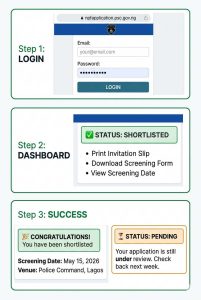
Since the announcement by the Nigeria Police Commission about psc shortlisted candidates 2026, candidates can follow these exact steps to check if you have been shortlisted for the Nigeria Police Force recruitment.
Step 1: Visit the Official PSC Portal
Open your browser (Chrome or Firefox works best) and go to:
https://npfapplication.psc.gov.ng
Do not use a phone browser if possible. Use a laptop or desktop computer for better performance.
Step 2: Log in to Your Account
On the homepage, you will see a login section. Enter:
- Your email address (the one you used during application)
- Your password (the one you created when registering)
If you forgot your password, click “Forgot Password” to reset it. A reset link will be sent to your email.
Step 3: Check Your Application Status
After logging in, your dashboard will display one of the following statuses:
| Status | Meaning | Next Action |
|---|---|---|
| “Shortlisted” | You have been selected for the next stage | Print your invitation slip and prepare for screening |
| “QUALIFIED” | Same as shortlisted — you have passed initial screening | Print all required documents |
| “Not Shortlisted” | You were not selected in this batch | Check again later for subsequent batches |
| “Pending” | Your application is still being reviewed | Keep checking daily |
Step 4: Print All Required Documents
If your status shows “Shortlisted” or “QUALIFIED”, you must immediately print the following documents from the portal :
| Document | Where to Find on Portal |
|---|---|
| Invitation Slip (with assigned table number) | Click “Proceed to Physical Screening” |
| Application Submission Slip | Dashboard or “My Application” |
| Physical Screening Form | Dashboard or “Download Forms” |
| Credential Screening Form | Dashboard or “Download Forms” |
| Guarantors Form | Dashboard or “Download Forms” |
The Invitation Slip contains your scheduled date, time, and venue for the physical screening. Do not miss your assigned date .
Step 5: Save and Backup Everything
After printing:
- Save all documents as PDFs on your phone
- Take clear screenshots of your status page
- Store physical copies in a safe folder
- Make at least 2 photocopies of each document
What to Do After Finding Your Name on the PSC Shortlist
Congratulations. Being shortlisted means you have passed the initial application screening. But the hard work is just beginning.
Immediate Actions (Within 24 Hours)
| Task | Deadline |
|---|---|
| Print all required documents (5 items) | Immediately |
| Read your Invitation Slip carefully | Immediately |
| Note your screening date, time, and venue | Immediately |
| Gather all original certificates | Within 48 hours |
| Complete your Guarantors Form | Within 48 hours |
| Get medical fitness certificate | Before screening date |
Required Documents for PSC Physical Screening
You must bring all of the following documents to your physical screening venue. Missing any document = disqualification .
Essential Documents (Must Bring)
| # | Document | Quantity |
|---|---|---|
| 1 | Invitation Slip (with assigned table number) | 2 copies |
| 2 | Physical Screening Form | 2 copies |
| 3 | Credential Screening Form | 2 copies |
| 4 | Application Submission Slip | 2 copies |
| 5 | Guarantors Form (duly completed and signed) | 2 copies |
Credentials and Certificates
| # | Document | Notes |
|---|---|---|
| 6 | Original NIN slip or NIMC card | Must be clear and readable |
| 7 | O’Level (WASSCE/NECO/GCE) Certificate | 5 credits including English & Maths |
| 8 | Birth Certificate or Age Declaration | From court or National Population Commission |
| 9 | Local Government / State of Origin Certificate | Duly signed by Chairman or Secretary |
| 10 | Medical fitness certificate | From government recognized hospital |
For Specialist Applicants Only
| # | Document |
|---|---|
| 11 | Degree certificate (minimum Second Class Lower) |
| 12 | NYSC discharge or exemption certificate |
| 13 | Professional certificate (e.g., BL for lawyers) |
| 14 | Trade Test/Certificate (for technical roles) |
Document Organization
Arrange your documents as follows :
- Original copies in one white flat file
- Duplicate copies in a separate white flat file
- Recent passport photographs attached to each file
- Guarantors Form with photocopies of referees’ valid identification and attached passport photographs
“Candidates must present original and duplicate copies of their credentials neatly arranged in two separate white flat files, with recent passport photographs attached” .
Dress Code for PSC Physical Screening
The dress code is strictly enforced. If you arrive in the wrong attire, you will not be allowed into the screening venue .
| Item | Required |
|---|---|
| Shirt | White T-shirt (plain, no logos) |
| Shorts | White shorts (plain) |
| Footwear | White canvas shoes (not sneakers, not slippers) |
| Socks | White stockings |
Do not wear: Jeans, colored shirts, black shoes, slippers, or any non-white clothing.
Physical Screening Process — What to Expect
Screening Stages
| Stage | What Happens |
|---|---|
| 1. Check-in | Present your Invitation Slip at the entrance. Find your assigned table. |
| 2. Document verification | Officers verify your original certificates against your online application. |
| 3. Physical measurements | Height measured (1.67m male, 1.64m female). Chest measured (male only: 86cm). |
| 4. Physical fitness test | Push-ups, sit-ups, squats, and 2km run. |
| 5. Medical check | Blood pressure, vision, hearing, and general health. |
| 6. Guarantors verification | Your guarantors may be contacted. |
Duration
The physical screening exercise is scheduled to take place from March 9 to April 18, 2026 across all states .
“You will appear strictly on the date stated on your invitation slip” .
How to Print Your PSC Examination Slip
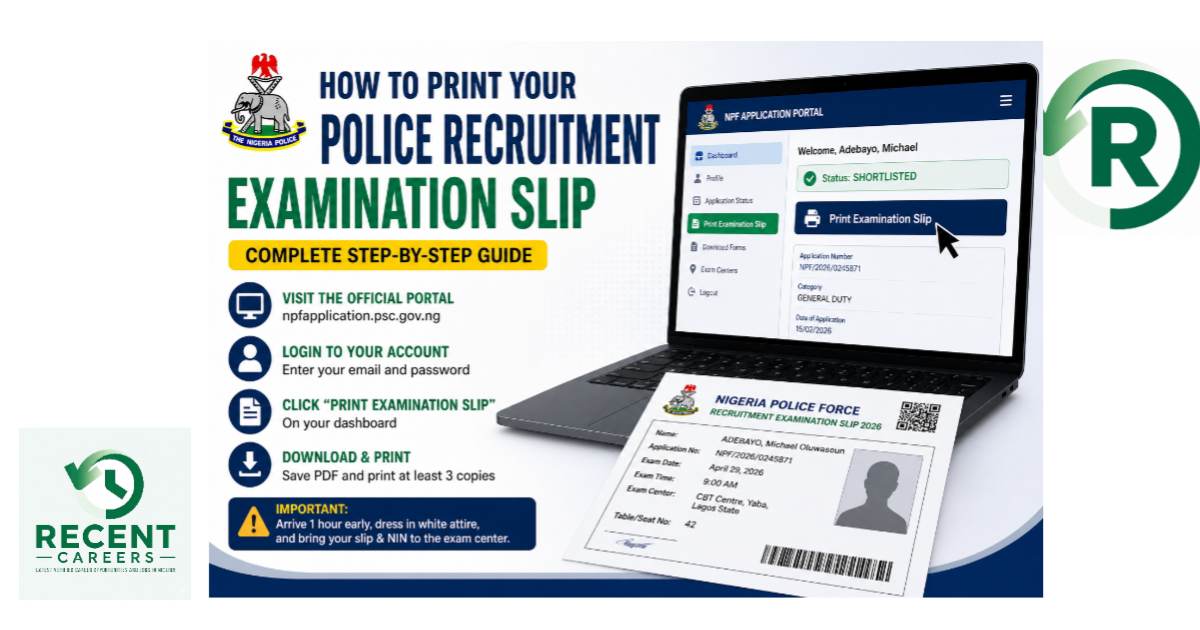
After passing physical screening, shortlisted candidates will receive SMS invitations for the written examination (CBT).
“You are invited to a written examination sequel to your success at the last NPF screening. Log in to npfapplication.psc.gov.ng to print your examination slip/IV.”
Steps to Print Exam Slip
- Visit npfapplication.psc.gov.ng
- Log in with your email and password
- Click on “Proceed to Physical Screening” or “Print Examination Slip”
- Your examination slip will appear showing:
· Your examination date
· Your examination time
· Your designated center - Print at least 2 copies
Written examination dates: April 28 – 30, 2026 .
What to Bring to the Written Examination (CBT)
| Item | Required |
|---|---|
| Printed examination invitation card | Yes |
| NIN slip (with clear photograph) | Yes |
| Pen (blue or black ink) | Yes |
| Same dress code as physical screening | Yes |
What If Your Name Is NOT on the PSC Shortlist?
Possible Reasons for Not Being Shortlisted
| Reason | Explanation |
|---|---|
| Batch not yet released | PSC releases shortlists in multiple batches |
| Application error | Typo in name, wrong date of birth, or missing document |
| Age disqualification | Above 25 years for constable or 30 for specialists |
| Height disqualification | Below required height |
| Education disqualification | Less than 5 credits or missing English/Maths |
| Criminal record | Previous conviction |
Next Steps If Not Shortlisted
| Action | Explanation |
|---|---|
| Check again in 1 week | New batches are released regularly |
| Verify your login details | Ensure you are using correct email/password |
| Contact PSC support | Email info@psc.gov.ng for assistance |
| Apply next recruitment cycle | PSC typically recruits every 2-3 years |
How to Avoid PSC Recruitment Scams
| Scam Type | What Scammer Says | Truth |
|---|---|---|
| “Shortlist addition fee” | “Pay ₦20,000 to add your name to shortlist” | The shortlist is computer-generated. Cannot be altered. |
| “Screening appointment fee” | “Pay ₦10,000 for early screening slot” | Screening is FREE. Slots are assigned automatically. |
| “Guaranteed success fee” | “Pay ₦150,000 to pass the CBT and screening” | No one can guarantee success . |
| Fake PSC portal | “Click this link to check shortlist” | Only npfapplication.psc.gov.ng is real. |
| Fake SMS | “You have been pre-selected. Send ₦5,000 for verification” | PSC sends SMS only for status updates, never for money. |
Frequently Asked Questions
How can I check if I am shortlisted for police recruitment 2026?
Visit npfapplication.psc.gov.ng, log in to your account, and check your application status.
Is the PSC shortlisted candidates list out?
Yes. The PSC has begun releasing shortlists in batches.
Can I check using my phone?
Yes, but printing is easier on a computer.
PSC Recruitment Stages Summary
| Stage | Status | Date (2026) |
|---|---|---|
| Online application | Closed | Completed |
| Shortlist release | Active | Ongoing |
| Physical & credential screening | Active | March 9 – April 18 |
| Written examination (CBT) | Upcoming | April 28 – 30 |
| Final shortlist | Pending | After examination |
| Training at Police College | Pending | After final shortlist |
Final Tips for Shortlisted Candidates
Do This Immediately
| Task | Deadline |
|---|---|
| Log in to npfapplication.psc.gov.ng | Today |
| Print all required documents | Today |
| Read your screening date and venue | Today |
| Gather all original certificates | Tomorrow |
| Complete your Guarantors Form | Tomorrow |
| Get medical fitness certificate | Before screening |
| Buy white T-shirt, shorts, canvas shoes | Before screening |
Do NOT Do These
| Action | Why |
|---|---|
| Pay anyone any money | Recruitment is FREE |
| Ignore your screening date | Missing your date = disqualification |
| Arrive late | Latecomers are turned away |
| Wear wrong attire | Dress code is strictly enforced |
| Bring photocopies only | Original certificates are required |
| Trust WhatsApp recruiters | Only the official portal is real |
About the Author
RecentCareers.com.ng helps young Nigerians navigate careers, government recruitment, and remote work. We are not affiliated with the Police Service Commission or Nigeria Police Force. All information is sourced from official public announcements.
Bashir Lawal abdullahi
Shortlist